LiveReal FIM completion
Ghost-text completion in <100ms from a 4B model running on your Mac via MLX. Not a remote round-trip. Not a fake heuristic.
 Compass
The native AI IDE for macOS
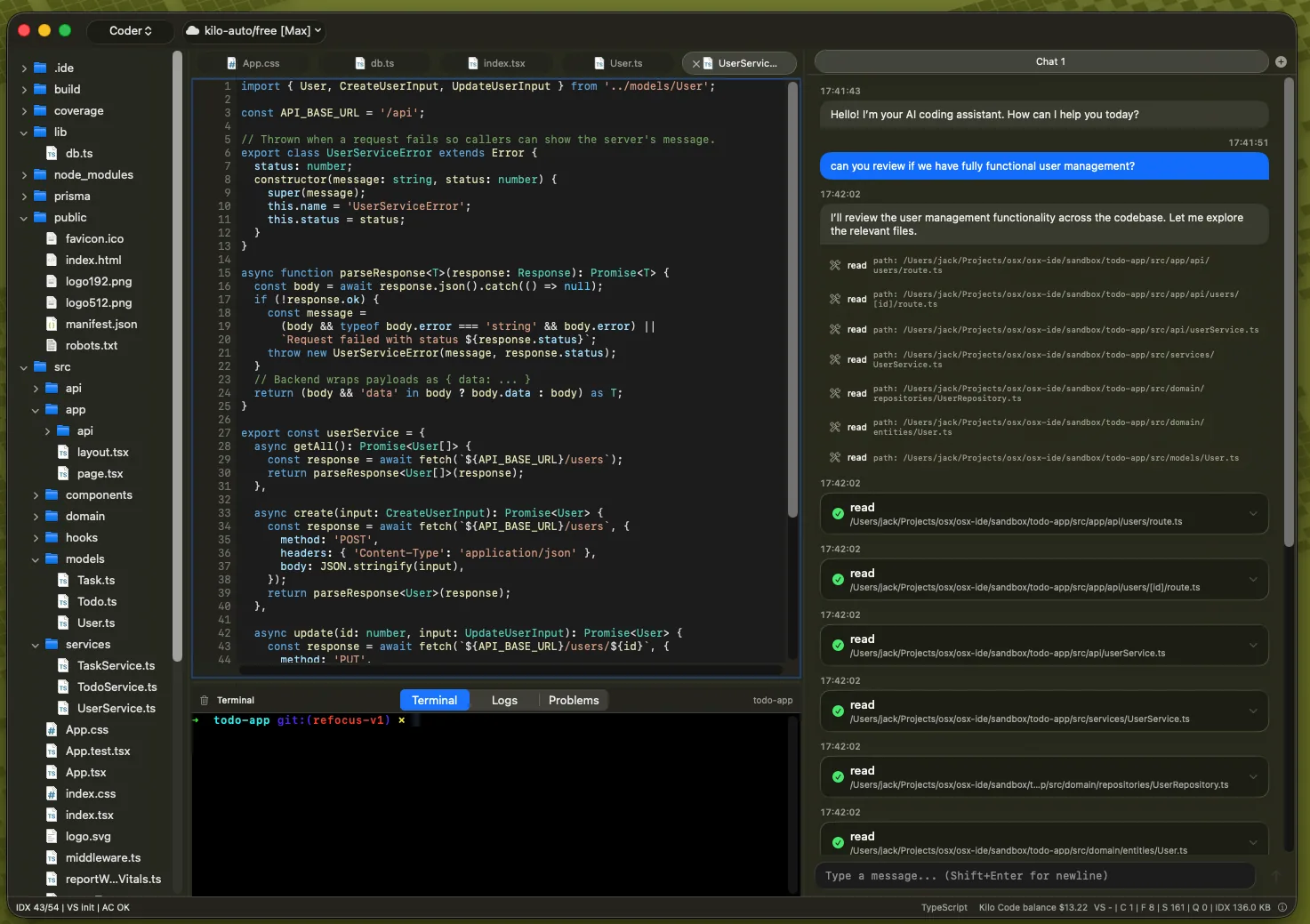
My MacBook Pro M4 has 16GB of RAM. Cursor and Docker were using all of it: YouTube started stuttering, and I was swapping like it was 2009. So I built Compass: a Swift-native IDE with agentic coding, on-device intelligence, and zero Electron tax. Same future. Your machine, your rules.
Sound familiar?
You switched because AI changed what an editor could be. This is where that story went, and where it goes from here.
It is, and you were right to want that. Agentic coding is the biggest shift since the text editor itself.
The editor alone eats a gigabyte. Add Docker, Chrome, Slack: a 16GB machine starts swapping, fans spin up, YouTube stutters. You're paying the RAM tax for a text editor.
$20/month per seat, whether you use it or not. The usage page gets less transparent. The roadmap belongs to a board now.
~200MB. SwiftUI, AppKit, Liquid Glass. Sub-100ms completion from a model that lives on your machine, not in a data center.
Planner → Worker → QA orchestration with 20+ tools, routed through OpenRouter, Kilo, DeepSeek, or any OpenAI-compatible endpoint. No per-seat tax.
No network? No problem. RAG over your whole codebase, FIM completion, local chat: the intelligence is on-device too.
Audit it. Fork it. It can't be sold out from under you. And installing it is one command.
Architecture
Local and cloud are completely separate AI pipelines that share the same native editor. Each is tuned for what it does best, and neither pretends to be the other.
Always on. Always private. No network required.
On demand. Full reasoning. Your keys, your choice.
Our on-device model is 4 billion parameters, running via MLX on Apple Silicon. Big enough to be genuinely useful, small enough to stay instant and private, and we never ask it to do cloud work.
Privacy by architecture
Most "AI" editors silently ship your source to someone else's servers before they'll autocomplete a single line. Compass never does. Completion, retrieval, and chat run locally; and cloud agentic work happens only when you explicitly reach for it.
Why native wins
Compass is a real macOS binary, compiled in Swift and accelerated by the Metal and Neural Engine frameworks. No Chromium. No Electron event loop burning your CPU. No gigabytes of JavaScript parked in RAM. Just an editor that feels like part of the OS.
The entire app, with every AI capability switched on, fits in roughly 200 MB. Smaller than most editors manage with AI turned off.
Tired of an IDE eating 80% of your RAM and slowing to a crawl? No JS loops, no listeners, no unaccelerated UI rendering. Just native performance.
Full access to low-level Apple OS features, including the latest Liquid Glass framework, something a web wrapper can never touch.
What you tolerate vs. what you get
We don't need to name names. If you're using a cloud AI editor, you already know this table from the inside.
Capabilities
These features are in the current open-source build. No waitlist, no invite, no gate.
Ghost-text completion in <100ms from a 4B model running on your Mac via MLX. Not a remote round-trip. Not a fake heuristic.
Ask questions, bounce ideas, get a second pair of eyes, entirely on-device. No API key, no network, no one listening.
Embeddings and retrieval run on the Apple Neural Engine, so indexing and search stay silent and painless, never hogging your CPU.
SQLite-backed index plus HNSW vector retrieval over files, symbols, and chunks: grounded answers drawn from your own code.
Planner → Worker → QA orchestration with 20+ tools. Route through OpenRouter, Kilo, DeepSeek, Alibaba, or any OpenAI-compatible endpoint. Your key, your bill.
Read docs and run commands without leaving the editor. One app, zero context-switching.
Cursor-anchored Q&A for instant explain, refactor, or ask, without losing your place in the code.
HNSW ANN vector index with on-device embeddings, 10–50× faster than brute-force with ~95–99% recall.
On the roadmap
SSH and SFTP integration so the agent works in your infrastructure.
Adaptive rules and inspectable memories that teach the assistant your conventions per repository.
Direct provider integrations: on the roadmap, not vapor. Until then, OpenRouter covers them through one key.
Extensions for tools, languages, and workflows. The ecosystem question, answered in the open.
Funded by sponsors: the $99/year Apple fee, paid by the community, so your Mac trusts us out of the box.
Under the hood
Embeddings and retrieval run on the ANE, so indexing and search stay silent and painless, never stealing cycles from your build.
Apple MLX running a quantized 4B model. Instant, private, offline. Swap models anytime without a website update.
Hierarchical Navigable Small World index over FAISS vectors. 10–50× faster than brute-force with ~95–99% recall.
Symbol and content search over indexed files and chunks, combined with vector retrieval for grounded answers.
Tree-sitter AST parsing with the Neon runtime for fast, accurate syntax highlighting across 20+ languages.
Native NSTextView editor with SwiftUI overlays and Liquid Glass. No Chromium. No web view. Just macOS.
Fair questions
The questions everyone asks before switching. The answers are the same ones we give on GitHub, HN, and Reddit.
Agentic quality is the model you bring. Compass gives you the orchestration (Planner → Worker → QA with 20+ tools and stall detection), and you choose the brain: OpenRouter, Kilo, DeepSeek, Alibaba, or any OpenAI-compatible endpoint. Bring the best model in the world; we run it at native speed. Our orchestration is open and harness-tested, and the tests are in the repo.
MIT licensed, ~40k lines of Swift, CI green, and you can build it from source if you want to verify. Compass ships without Apple's paid notarization, like many open-source Mac apps; on first launch, right-click the app, choose Open, and confirm. We'd rather be transparent than pretend.
Compass is the editor I use every day to build itself. It's MIT, so even if I vanished tomorrow, it's yours, forever. I'm not planning to vanish: the roadmap is public, the code is open, and the community decides what comes next.
Deliberately. Going deep on Apple Silicon is how the app stays ~200MB with sub-100ms completion and Neural Engine acceleration. There are plenty of editors that work everywhere. There's one native AI IDE for macOS.
On the public roadmap. Until it lands, OpenRouter gives you Claude and GPT through a single key, today.
We never ask local to do cloud's job. Local handles what must be instant and private: completion, Q&A, search, chat. Cloud handles what needs frontier reasoning: agentic work with your key. Right tool for the job, always.
Live. Semantic search p95 is 0.46ms on a 2,000-vector index, 2,000 entries add in 158ms, embeddings run at 3–15ms on-device. Full table, methodology, and regression gates on the Benchmarks page, and you can run ./run.sh benchmark yourself. FIM latency with the 4B model is next, and we won't publish it until we've measured it.
Keyboard is keyboard. Command palette, familiar editing, native macOS feel. Fifteen minutes and you're home. Your Mac gets a gigabyte of RAM back.
Yes. One brew line to onboard, your team's keys, usage-based cloud instead of per-seat. Zero egress by default tends to make security teams happy.
One command via Homebrew: brew install --cask jtrefon/compass/compass. Or grab the DMG from GitHub Releases. Either way, the first launch is a two-second confirmation: right-click → Open. That's the whole ritual.
Install
Open source, MIT, free: no account, no trial, no credit card. Requires Apple Silicon and macOS 26+.
One command, works with the current release.
Downloads the latest release and checks its signature.
The installer is open source: read install.sh
Ships without Apple's paid notarization, like many open-source Mac apps. On first launch, right-click the app, choose Open, and confirm. The full source is in the repo.
Roadmap
Built because it had to be
Download Compass, star the repo, open an issue, or tell us what's missing. This project is built in the open, and the community decides where it goes.